
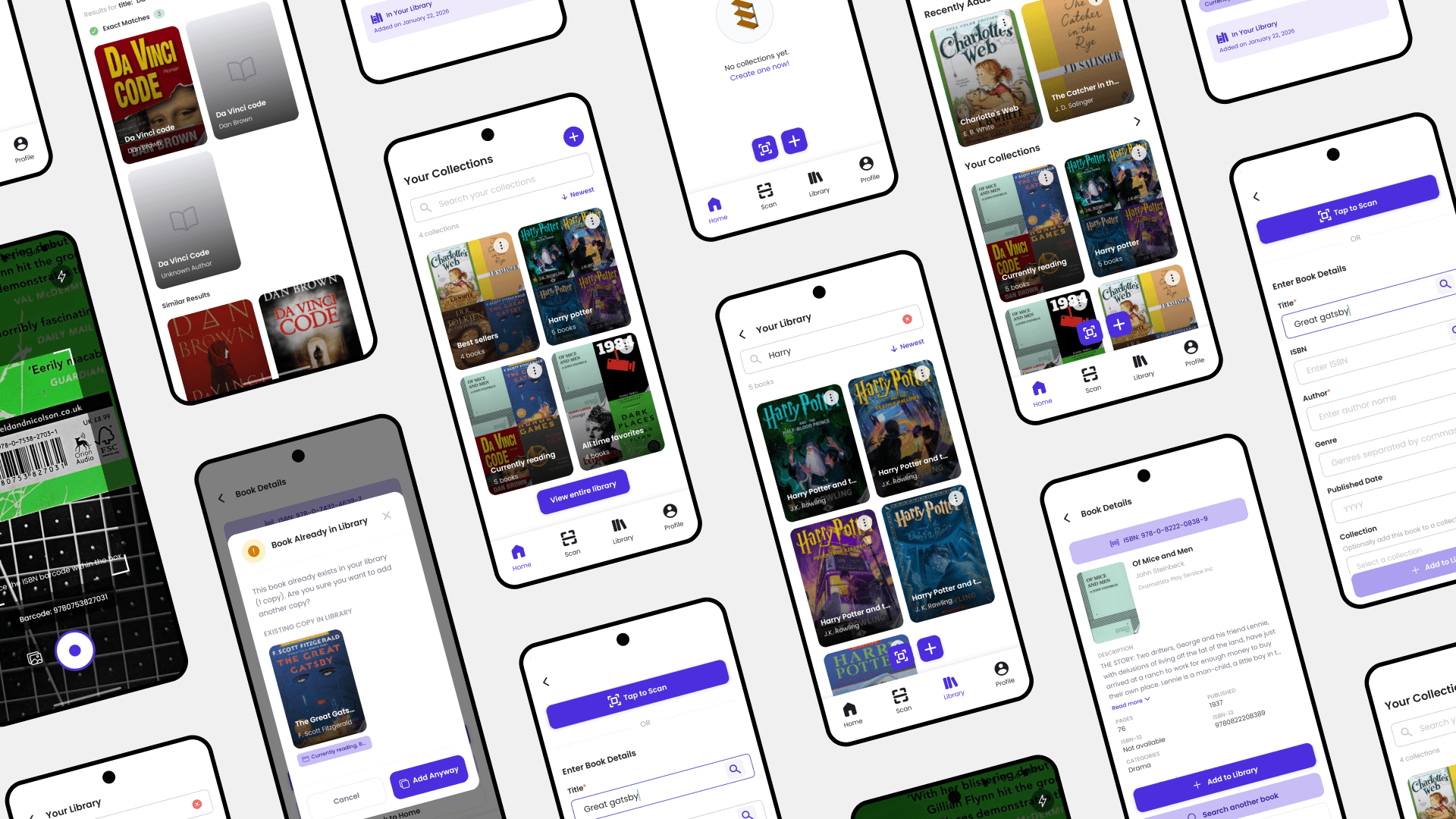
Quick Summary
Problem: Readers buy duplicates. No existing app solves for ownership since they're built for sharing, not collecting.
Approach: On-device library app with ISBN duplicate detection. Claude ran through the whole pipeline — API prototypes early, Figma specs straight into working device builds.
Role: Solo Creator; responsible for research, design, code, backend, shipping it.
Outcome:
Live on Play Store, 2 months, one person
Design updates that would've taken a sprint took hours
Readers have no reliable way to check whether they already own a book while they're standing in a shop. Existing apps are built for social sharing, not ownership. They need a connection, they route your data through Amazon, and none of them will stop you buying the same book twice.
Build a library manager that works offline, catches duplicates at the ISBN level, and actually accounts for how physical collections work: multiple editions, half-sorted piles, books you bought twice.
Product Strategy
Interaction Design
Interface Design
Mobile Development
Design System
UX Research
Figma
React Native
Expo
TypeScript
Supabase
Claude AI
Started as a personal tool, but designed to scale to readers who want full ownership of their reading data
Shelfmate started because I bought the same book twice, on multiple occasions. Then I watched it happen to other people. The tools that existed weren't built for this since they were built for sharing. Reading apps route your library through Amazon. Most alternatives are wishlists with better UI. None of them could answer the one question a physical book collector asks every time they walk into a shop: do I already own this?
AI was part of the build from the beginning — not brought in at the end to speed things up, but used to validate how the Google Books API actually behaved before any design decisions were locked, and to turn Figma screens directly into working React Native builds on a real device. That's what made a two-month, solo, zero-to-ship timeline possible. One person, but the pipeline of a team.
Before committing to a design direction, I ran a survey of 49 readers to check whether the frustration I'd experienced was mine alone or something wider. It wasn't. Most readers had no real system for tracking their physical collections. The ones who did were using memory or whatever was already on their phone like spreadsheets, photo rolls, notes apps; none of which were built for this. The small group using a dedicated app was almost entirely on Goodreads, which is owned by Amazon and built around social sharing, not collection management.
have no structured tracking system
don’t track their collection at all
use a dedicated app (Goodreads, etc.)
likely or very likely to try a new tool
open to further research or beta testing
The numbers that stood out weren't the ones showing how broken the current situation was. It was the 85.8% who were open to further research or beta testing, and the 42.8% who said they'd likely try something new. Readers weren't indifferent to the problem. There just wasn't a tool worth switching to yet.
Most people discovered books through physical shops and word of mouth, which meant the moment the problem hit hardest was mid-browse, in a shop, with no easy way to check what they already owned.
I looked at Goodreads and Fable as the dominant players, then Letterboxd separately, not as a direct competitor, but as a reference for what it looks like when a social app puts the individual user first.
Social discovery & reading history
Routes through Amazon's ecosystem; limited exports
No duplicate detection; same ISBN can be added multiple times
All editions merged; no multi-copy support
No offline capability
Reading data tied to Amazon account
Social reading clubs & group reads
Cloud-dependent; no on-device option
Not a collection tool
Discovery-focused
No offline capability
Data stored in third-party cloud
The pattern was consistent. Every existing tool was built around reading as a social activity. None of them offered offline capability, duplicate detection, or any logic for physical collections — different editions, multiple copies, books that exist in the real world rather than a database. The category had optimized for engagement, not ownership.
The profile was built around behavior: someone who buys physical books regularly, cares about what they own, and is currently keeping track through a mix of memory and systems they've fused together. The specific reader this project focuses on browses actively, buys often, and has stood in a bookshop genuinely unsure whether they already own something. That moment is what Shelfmate is built around.
To understand where the friction actually lived, the experience was mapped across three stages: before, during, and after a purchase, and the pain points were pulled from there. Each stage has its own problems, and they tend to stack.
Key Pain Points
🫥 Ownership Blind Spots
Readers have no reliable way to check if they already own a book while browsing. Memory fails, and pulling up a spreadsheet mid-aisle breaks the moment entirely.
🧩 Fragmented, Untrusted Systems
Notes apps, photo rolls, spreadsheets; most readers are juggling three systems that weren't built for this and don't talk to each other.
👁️ Privacy as a Hidden Cost
Tools like Goodreads require surrendering reading data to Amazon's ecosystem. Users either accept this or avoid tracking altogether.
📚 Apps Don’t Reflect Real Libraries
Real shelves have two editions of the same title, or the same book in paperback and hardcover. Most apps treat them as one entry. They're not.
✈️ No Offline-First Option
Every mainstream tracker requires an account and a connection to function. Readers who want local-only data have nowhere to go.
The Impact
💸 Duplicate book purchases from lack of collection visibility
🏳️ Abandoned tracking altogether; no tool felt worth the trade-off
🌊 Personal libraries remain disorganized with no scalable structure
The research made the priority clear: the first thing the app needed to do was answer the ownership question. Everything else like collections, sorting, organization, came after. Building friction into that first moment would have killed the core use case before it started.
The workflow ended up flat on purpose: scan, check, and add. Collection assignment was made options in the scan step after early testing showed people scanning several books at once and coming back to sort later. The system needed to let them do that, not force a decision at the wrong moment.
Register Book
Add to Collection

There was no handoff in this process. Design and build ran together from the start — Claude wasn't brought in at the end to speed things up, it was part of how decisions got made throughout.
Phase 1: API Validation
Before committing to any design direction, early functional prototypes were built through Claude to validate how the Google Books API returned data, how ISBN lookups behaved under edge cases, and how WatermelonDB would handle the data model. Design decisions came after the technical constraints were already known.
Phase 2: Figma as Build Instructions
Once flows were validated, a full design system and wireframes were built in Figma. These were fed directly into Claude Code to generate working React Native screens. The first high-fidelity version of every screen was already running on a physical device before manual refinement began.
Phase 3: Iteration Without a Team
When user testing required a rebuild of the collection system, there was no sprint to plan, no handoff to wait on. Updated Figma screens were handed directly to Claude Code. The cycle from insight to working build was measured in hours. What a full team would take two weeks to scope, hand off, build, and QA was resolved in a single session.


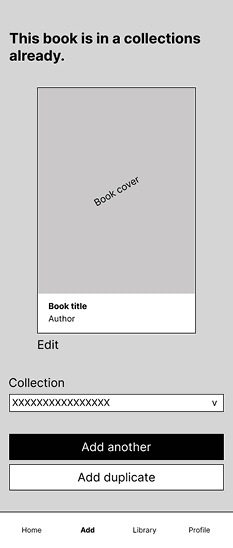
The wireframes covered four core flows: the library view, the scan and search screen with duplicate detection inline, a manual entry fallback for books the Google Books database doesn't have, and the book detail page with edition-specific data. The constraint that shaped all of them: duplicate detection had to show up at the moment of scanning. Not a separate step, not a later screen. Right there.
Testing ran throughout the build — with readers from the same survey pool, and through continuous personal use on a physical device. The goal wasn't validation. It was finding where the flows broke under real conditions before those conditions became a review.
The useful stuff didn't come from what people said they wanted. It came from watching what they actually did. Those two things were often different, and the gaps between them changed the product.
Duplicate Book Detection

Duplicate detection was moved directly onto the scan result screen. No extra tap. No separate screen. ISBN matching catches different editions of the same title.

Google Drive backup was added as an explicit opt-in. Restore uses a smart merge strategy — it never overwrites existing entries. Users stay in full control of when and whether it runs.
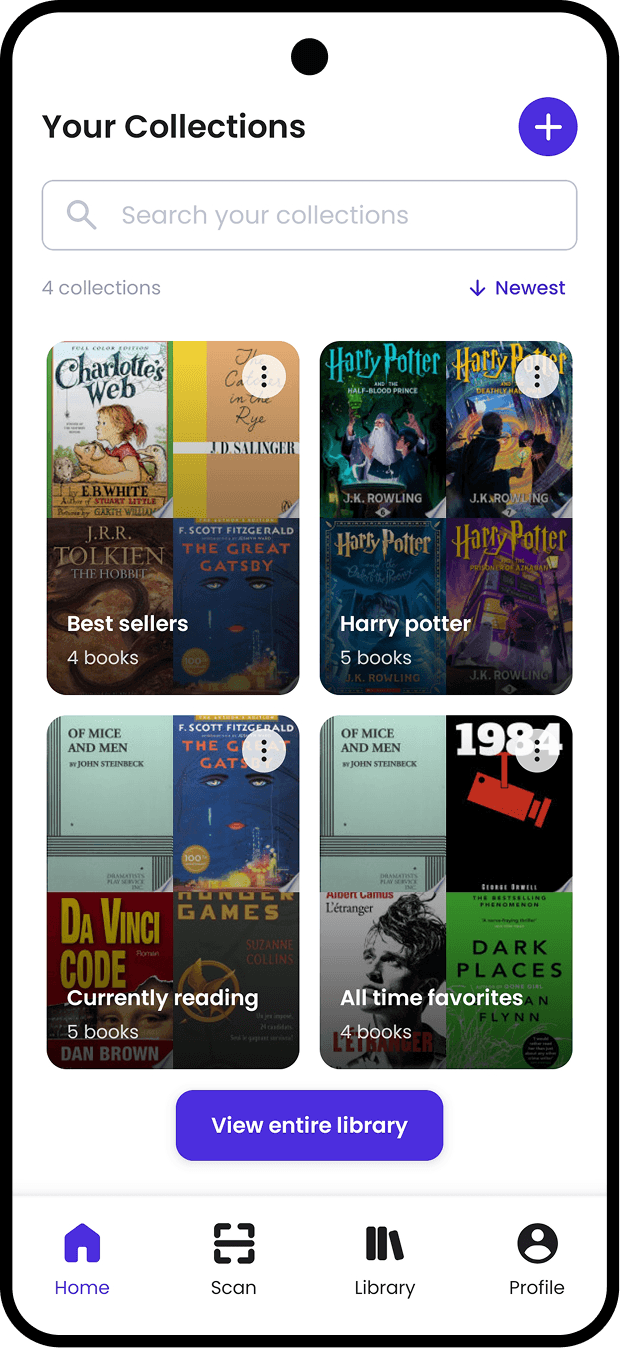
The entire collection system was rebuilt. The original one-book-at-a-time shelf model was replaced with a system that decouples scanning from organizing. Books can be assigned to collections at any point after adding.
Every decision had one owner. No one to catch a bad assumption before it became a built screen, no one to push back on scope creep before it became a problem.
Data and API Reliability: Google Books has real gaps, mainly being older titles, regional editions, ISBNs that come back wrong or empty. The app had to absorb those failures quietly. Manual entry wasn't a safety net. It had to work as well as the scan.
Privacy vs. Convenience: On-device storage was the whole point, but it meant there was no server to fall back on if someone lost their phone. The backup had to hold the same standard: opt-in, portable, and it never touches data the user hasn't explicitly asked it to replace.
What Users Said vs. What They Did: The design assumed people would sort books into collections as they scanned. They didn't. Batch scanning and deferred sorting was the actual behavior, and the original model made that needlessly awkward. Fixing it meant rebuilding screens and data structures that were already done. The AI pipeline made that one session, not a sprint.
Scope Without a Team: Reading stats, scheduled backups, iOS, barcode scanning are all real features that were cut. When there's no one else to weigh a decision with you, saying no to good ideas is harder than it sounds.
The design system was built in Figma on a violet palette with Poppins typography, with violet specifically to push against the earthy, warm tones that dominate the book app category. The intention was something that felt closer to a tool than a reading journal.
Those same Figma files fed directly into Claude Code as build instructions, so the system served two purposes: design reference and implementation spec.
Every screen runs on-device via WatermelonDB, with Supabase connected through a Cloudflare Worker Backend-For-Frontend.


At the time of writing, Shelfmate is live on the Google Play Store as a fully private, on-device reading companion. The core outcomes of the project span the product, the process, and what the work demonstrates about how design can be done.
0→1, Solo Creator: Product strategy, design system, React Native development, backend, and infrastructure, designed, built, and shipped to the Play Store by one person.
Private by Default: Reading data stays on-device. Google Drive backup uses a merge strategy that never overwrites existing entries. Nothing goes to the cloud unless the user explicitly sends it there.
No Handoff Gap: Figma screens moved directly to working device builds without a separate engineering sprint. What would normally take weeks of scoping, handoff, and QA happened in hours.
Behaviour Over Assumptions: The collection system was rebuilt based on what users actually did in testing — not what they said they'd do. That's not a refinement. It's a different product.
The project solved the problem it set out to solve. It also ended up being a test of a different way of working — and those lessons were worth writing down.
What people say and what they do are different things: The survey got the project started. Watching people actually use the app rebuilt it. Nobody sorted books into collections mid-scan. The design assumed they would. That assumption cost a rebuild, and the rebuild made the product better.
Privacy-first is a design constraints: Deciding to keep data on-device shaped everything downstream; backup logic, onboarding, sync, how search had to work. It wasn't a toggle. It was a constraint that every other decision had to work around.
AI changed what was possible, not just what was fast:. Running prototypes through Claude before any design was locked meant technical constraints were known early. Figma screens going straight into Claude Code meant no handoff gap. A rebuild that would have taken a sprint took one session. The pipeline didn't just save time and it changed the scope of what one person could actually ship.
A design system is only as good as its implementation: Having tokens in Figma means nothing if they don't survive the build. Keeping the system in sync across Figma and production code eliminated an entire category of design drift.
Scope is a design decision: Every unbuilt feature was a deliberate call. Apple Sign-In, reading stats, social features — all real ideas, all set aside. Knowing what to leave out kept the core tight.
What's Next?
An iOS Release: The Android build proved the core works. iOS is the next platform, with Apple Sign-In and Google Drive support built in from the start.
Backup that doesn't need remembering: Manual backup works, but nobody remembers to do it. Scheduled automatic backup is the obvious next step. The infrastructure is already there. Will always remain as opt in.
Reading stats and personal insights: The data is sitting there; books added, collections built, reading history over time. Surfacing that in a way that feels personal rather than dashboard-y is something I want to get right before shipping it.
